
Materialized views
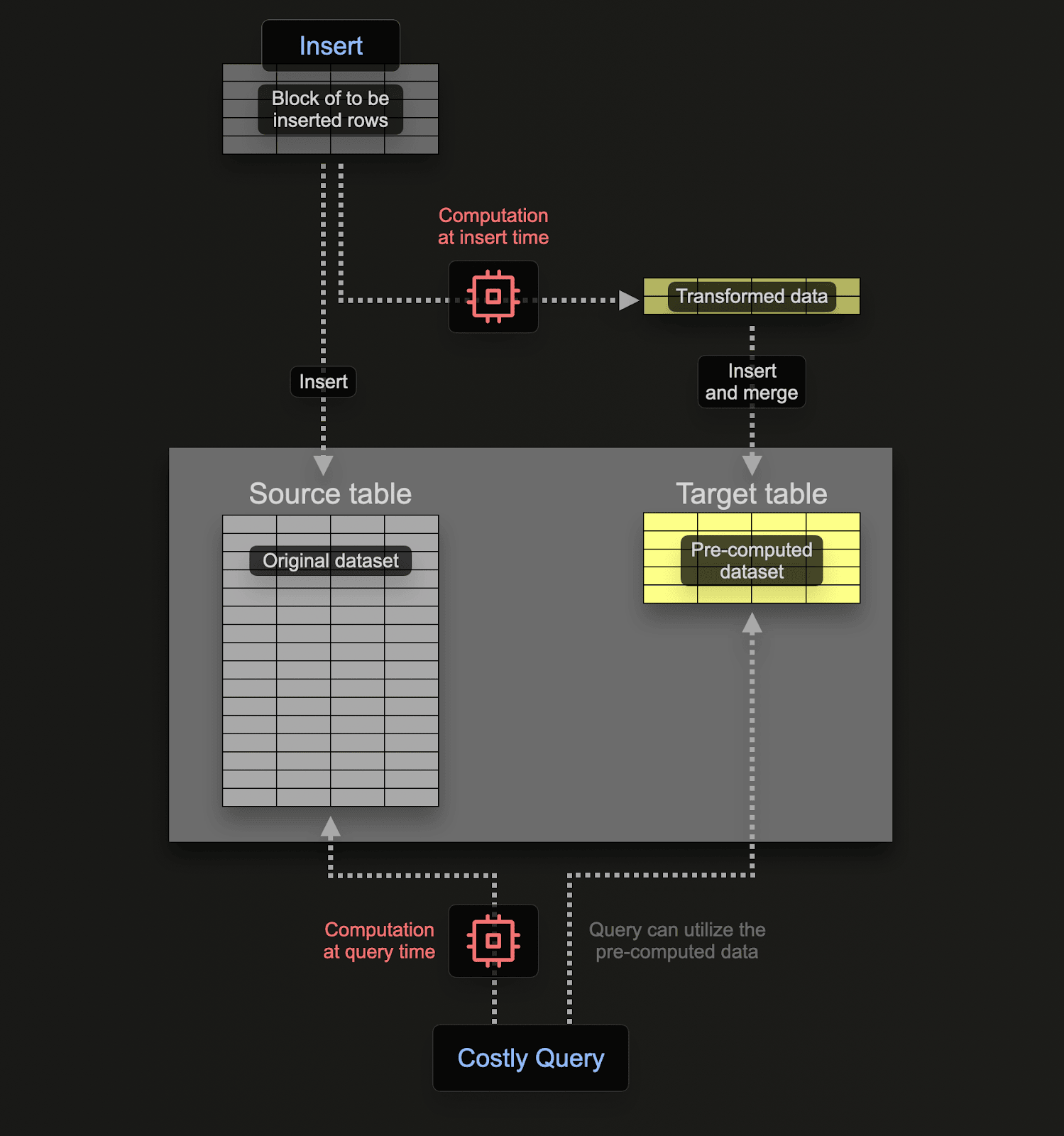
This is not a cached query. Nothing is recomputed at read time — the destination table already holds the rows, so reading it costs what reading any table costs.
Create a view and its target#
Create the destination table first, with its own engine and sorting key chosen for how you will query it:
CREATE TABLE uk_price_paid_by_town
(
    town  LowCardinality(String),
    date  Date,
    price UInt32,
    type  Enum8('terraced' = 1, 'semi-detached' = 2, 'detached' = 3, 'flat' = 4, 'other' = 0)
)
ENGINE = MergeTree
PARTITION BY toYYYYMM(date)
ORDER BY (town, date);
Then create the view pointing at it with TO:
CREATE MATERIALIZED VIEW uk_price_paid_by_town_mv
TO uk_price_paid_by_town
AS SELECT
    town,
    date,
    price,
    type
FROM uk_price_paid;
Always use the TO form. Without it, ClickHouse creates an implicitly named destination table (.inner.xxx) that is harder to work with directly.
Backfill existing rows#

The view only processes future inserts. Rows already in the source table are invisible to it, so copy them across manually:
INSERT INTO uk_price_paid_by_town
SELECT
    town,
    date,
    price,
    type
FROM uk_price_paid;
This writes into the destination table directly, bypassing the view.
POPULATE exists as a shortcut, but rows inserted while it runs are missed. Creating the view first and backfilling with INSERT ... SELECT has no such gap.
Maintaining aggregates#
The common production use is a pre-aggregated table that stays current. Target AggregatingMergeTree, write with -State combinators, and read with -Merge:
CREATE TABLE daily_stats
(
    day Date,
    country LowCardinality(String),
    visits AggregateFunction(count),
    unique_users AggregateFunction(uniq, UInt64),
    avg_duration AggregateFunction(avg, Float64)
)
ENGINE = AggregatingMergeTree
ORDER BY (day, country);
CREATE MATERIALIZED VIEW daily_stats_mv TO daily_stats
AS SELECT
toDate(timestamp) AS day,
country,
countState() AS visits,
uniqState(user_id) AS unique_users,
avgState(duration) AS avg_duration
FROM events
GROUP BY day, country;Readers must finalize the states:
SELECT
    day,
    country,
    countMerge(visits) AS visits,
    uniqMerge(unique_users) AS unique_users,
    avgMerge(avg_duration) AS avg_duration
FROM daily_stats
GROUP BY day, country
ORDER BY day DESC;
States rather than final values are required because parts merge over time — a stored uniq count cannot be combined with another, but a uniq state can. For plain sums, SummingMergeTree is simpler and needs no combinators.
What materialized views do not do#
They do not track updates or deletes
Views fire on inserts only. Delete or update rows in the source table and the destination has no idea — views do not stay in sync with deletes or updates. Use projections when you need a derived view that tracks the source exactly.
They store data twice
The destination table is real, physically stored data. That is what makes reads fast, and it is a disk cost you should measure:
SELECT
    table,
    count() AS parts,
    sum(rows) AS total_rows,
    formatReadableSize(sum(bytes_on_disk)) AS compressed_size
FROM system.parts
WHERE table IN ('uk_price_paid', 'uk_price_paid_by_town')
  AND active = true
GROUP BY table;
An error in a view can fail the insert
When a view's SELECT throws, the originating INSERT can fail. A view over a critical ingestion path is part of that path's reliability, not a side channel.
Multiple views fire in undefined order
Several views can attach to one source table. They all run, but the order is not defined — do not build a chain that depends on one running before another.
Refreshable views#
When you need periodic full recomputation rather than incremental updates, a refreshable view re-runs its entire query on a schedule:
CREATE MATERIALIZED VIEW summary_mv
REFRESH EVERY 1 HOUR
TO summary_table
AS SELECT ... FROM source_table GROUP BY ...;
Use this for joins that incremental views handle badly, and for aggregates where an hour of staleness is acceptable.
Next steps#
- Table engines — pick the right engine for the destination table
- Insert data efficiently — views run on the insert path, so batching matters more
- Optimize query performance — projections as the alternative to views