
AI writes and updates your docs
What is the Docsbook agent?#
docsbook_agent does a documentation job end to end. You say the goal — "document the new API", "our quickstart loses people on step 3" — and it decides the steps.
- Reads — the repository, the published pages, connected sources, analytics, and what the web outside your docs says.
- Writes — new pages, rewrites, moves and navigation, as git commits in a pull request.
- Configures — branding, navigation, languages, and the prompt of the AI chat.
- Measures — the reading before a change, the prediction, and the same reading after it.
A job runs for minutes, not seconds. When a decision is yours, it asks instead of guessing, and it knows Docsbook itself: the product's own documentation is part of what it works from.
The chat in your panel edits a page you name on the spot. A job that needs a pass over the whole site goes to the agent.
Three ways to put it to work#
Say it in one sentence — from Claude Code, Cursor, Codex or any MCP client connected to Docsbook, or in the chat in your panel. In Claude Code, connect once:
claude mcp add --transport http docsbook https://docsbook.io/api/mcp/serverThen ask: "Use the Docsbook agent: our quickstart loses people on step 3, fix it." The call returns a task id at once. docsbook_agent_activity shows each step live, docsbook_agent_reply answers its question or adds to the job, and docsbook_agent_stop ends it. Connect your editor covers every client.
A trigger wakes the agent on a schedule, on something that happens in your docs, or on a change in GitHub — with the prompt already written. 49 ready-made cards cover writing, audits, answers, reports and translation.
The Docsbook agent card at the top of Triggers is the autonomous one: switch it on and it runs every hour, deciding for itself what your docs need most.
Create a project with a website and Generate docs from your site runs once: it reads about ten pages of your site plus the files you attached, and turns the template into your docs.
Without a website, Generate docs from your brief drafts the docs from your description, files and screenshots, and turns what it could not confirm into questions. Either way, the report lands in your Inbox.
What does the agent do on its own?#
With its trigger cards switched on, the agent works every plane of your documentation without being asked. Each loop reads a signal, changes pages, and measures the result:
Organic search audit, weekly: finds what keeps pages out of results and fixes pages that already get impressions before writing new ones.
Do AI engines cite you, weekly: asks answer engines about your product and fixes what makes them get it wrong or name someone else.
Answer what the chat could not, Fix what readers rated down and Write the pages readers wanted run when the chat fails, a page is rated or a search finds nothing.
Find pages the code outgrew runs on every commit; Refresh the quickstart walks your first page from a cold start every week.
MCP sync, OpenAPI sync and SDK sync compare the reference with the server, spec or SDK it documents, every day.
one card per language, 15 languages: publishes each translation and keeps it in step on every commit. The prose is translated, the code never is.
Cards that run on every commit need semantic search switched on — Triggers explains why. Beyond the cards, the Docsbook agent card runs every hour on its own judgement. It looks at how findable the site is — missing pages a new reader would search for, anything keeping search or AI engines away, competitors named where you should be — and does what is worth doing that day.
The agent checks its work against the 299 rules of the expertise catalog, before writing and again after, and a change can state up front what it expects to move. Find wins fast shows how a fix is chosen and proved.
What does it work with?#
The agent has 172 tools. These are its own: your MCP client gets a smaller set, listed in the MCP tools reference.
| Toolbox | Tools | What it lets the agent do |
|---|---|---|
| Research | 16 | Read Google's and Bing's live results with the AI Overview and its sources, keyword demand, autocomplete and search trends, backlinks, Reddit, Hacker News, Stack Overflow and Discourse threads, app reviews, job postings, X and LinkedIn profiles, and up to 50 pages of a competitor's docs |
| Analytics | 36 | Traffic, Search Console rankings, failed searches, unanswered and rated-down answers, dead ends, pages readers circle back to, goals and funnels, AI mentions, and the before-and-after of a single commit |
| Evidence | 6 | Collect the rows behind a judgement in code, with no model: traffic and how visits end, on-site searches, what readers asked the chat, whether AI can fetch your pages, the page map, page text as it arrives on the wire |
| Expertise | 7 | Check pages against the 299 rules, record verdicts with their evidence, list what is outstanding, measure predictions, and read competitors' pages against the same rules |
| Content | 15 | Read, search and write pages; connect and read sources; pick widgets and skills; set a page's status |
| Site settings | 20 | Branding, navigation, domain, languages and translations, the AI chat's prompt and hooks |
| Issues and pull requests | 7 | File and comment on GitHub issues, read pull requests, and check whether an idea was already tried and rejected |
| Memory folder | 5 | Read, write, search and retire what earlier runs learned about your product — see memory |
| Triggers | 8 | Arm schedules, product events and app occasions, and hand you the link to connect an app |
| Alerts and webhooks | 25 | Register, test and replay outbound webhooks |
| Goals | 6 | Define goals and funnels and count who completes them |
| Inbox | 2 | Write you a report or a question |
The other 19 read its own call history, its playbooks and Docsbook's documentation, find their way around the project, and create the claim link that hands a finished site to its owner.
Is it safe to hand it the docs?#
Yes — the safety is in how changes land, not in a promise:
- Every change is a pull request — an ordinary git commit in your repository, reviewable and revertible. Auto-merge decides whether it publishes itself or waits for you (review).
- Writing never approves — a new page lands at
generated, an editedapprovedpage goes back toreview, andlockedandarchivedpages refuse the write. Approval is a separate step,set_doc_status. - Scoped to your project — each run gets a credential fenced to your project and revoked when the run ends. It cannot create projects, change who has access, or grant itself access to a repository.
- Stops when you say —
docsbook_agent_stopends a job, switching a trigger off stops its next run, and a run is told to wind up when the balance runs out.
What does it cost?#
Agent runs are part of Pro: $20 a month, which comes back as $20 of AI usage every month. Every account gets one 14-day Pro trial with $5 of credit — the days count from when you first open a project, and the trial ends at whichever runs out first. See Plans and pricing.
- A run costs $0.10 plus twice what the model tokens it burns cost, capped at $50 for one run. A short task costs cents.
- Tool calls the run makes to Docsbook are metered per call like any MCP call — at twice what serving them costs, a few cents per thousand for most.
- To start, a run needs at least $0.10 of balance. With a paid subscription it can keep going past the monthly allowance on overage, up to a cap you set ($200 by default), billed weekly.
Each run's tokens and cost are in Activity ▸ Agent runs. The totals and your balance are in Settings ▸ Usage.
Where do you see it working?#
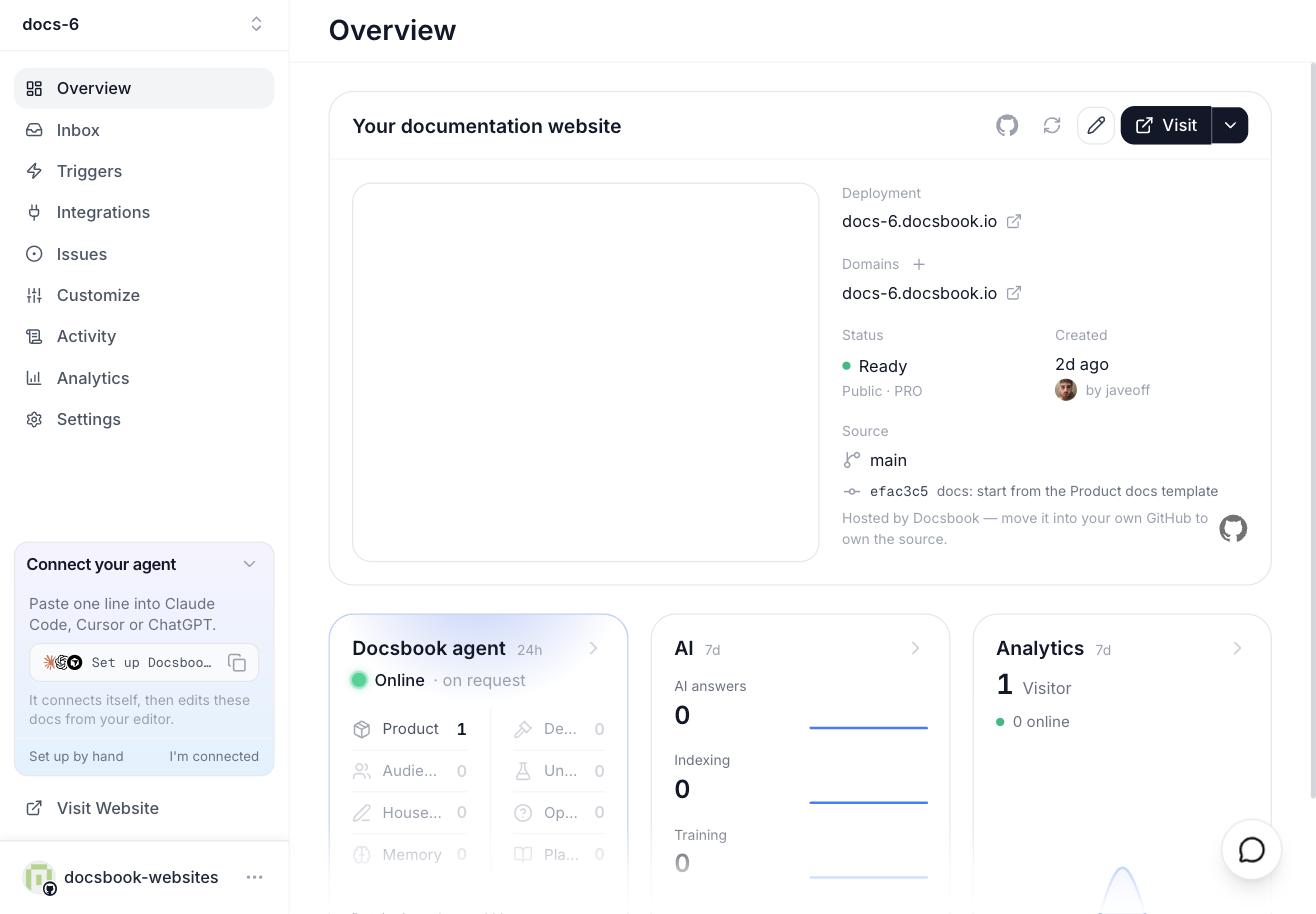
- Overview — the Docsbook agent card: whether it works on request or on a schedule, what its memory folder holds, and its latest report.
- Activity ▸ Agent runs — every run with its status, duration, tokens and cost; open one for a live step-by-step trace.
- Inbox — its reports, and the questions it needs you to answer.
- Issues — its issues and pull requests, each with a reason, a prediction and a date to check it.
- Triggers — a running card turns the accent colour and shows a spinner; click it to open the run.
FAQ#
Do I have to write prompts?
No. Each ready-made trigger card carries its prompt already, and for anything else one sentence with the goal is enough. Name the goal and the evidence ("support keeps asking how to rotate keys"), not the steps.
Can two jobs run at once?
They can, but give each intention one job. Two jobs on the same project can both be right about the pages and still land their changes in a conflicting order.
Where does it publish?
To the repository your site is built from: the Docsbook-hosted one, or your own GitHub repository once the Docsbook GitHub App is installed on it. Review and publish covers both.
Does it learn from earlier runs?
Yes. It keeps what it learns about your product in a memory folder that the next run reads, and it can search your issues and pull requests for earlier attempts at the same idea, rejected ones included.